Showing posts with label Open Source. Show all posts

Sunday, August 3, 2014

Apache Karaf 2.3.6 Released!

The Apache Karaf team are pleased to announce the availability of Apache Karaf 2.3.6!

This is an update patch for Apache Karaf 2.3.5, containing many bug fixes, dependency updates, and improvements. New feature highlights include: Automatically create data sources from configuration files, add backing engine serivce for PublickeyLoginModule, add a flag to bin/client so that it can read private key from a specified location, and Provide shell:env command.

It is recommended that you review our release notes before updating your deployments.

The Karaf 2.3.6 RC process was enjoyed with Placido Chianti 2011.

As always, I'd like to thank the community for coming together to help make the Karaf release process one of the best in all of open source software.


OpenDaylight Update:

The OpenDaylight port to Apache Karaf has been proceeding steadily towards a stable ecosystem wide build. Next week's Techicial Work Stream conference call will include an End-To-End Hands-on walk-through of ODL Karaf Features. I've copied in below the TWS meeting objectives as outlined by Madhu Venugopal:

"Due to multiple queries from various projects, we are organizing an end-to-end hands on walk-through on Karaf. This will cover all the way from

1. Writing the Karaf feature file on any project
2. Building the .kar
3. Loading the Karaf Container
4. Installing the built feature and Validation.

Time permitting, we will also be covering the Docker based Integration Testing & Sonar coverage. Mathieu Lemay & myself will be leading these topics.
We request at-least 1 representative from each of the projects participating in Helium to attend this session."

I strongly recommend all OpenDaylight developers and users attend this meeting, also any interested Apache Karaf community members as this is a great opportunity to see Karaf's many benefits being realized in a large scale project. Please see the meeting page for conference call details.

Monday, July 29, 2013

Dell Vostro 2420 upgrades

Last Fall I picked up a Dell Vostro 2420 as my Linux testing platform. I'm pleased to say that the machine performed admirably, supplementing my build infrastructure and providing a great sandbox environment for my Linux adventures.

A year later however I've began to find that the pre-installed Ubuntu and hardware were getting long in the tooth,  so I recently decided to take the plunge and update the machine. I went online and found some guaranteed compatible Ram and SSD from Crucial (2x4GB DDR3 12800 + 120GB SSD), then downloaded Ubuntu 12.04 LTS Desktop.

Of course having the opportunity to pop open the lid of the laptop to change it's hardware I thought I'd be best off to share some photos, and run a couple of quick benchmarks.

Under the hood:

To gain access to the laptop's internal components I removed all of the screws from the back of the machine, then pried off the keyboard. I unplugged the keyboard cable, and the power lines to the mouse, and power button. Three more screws had to be removed from the exposed interior before I could pry off the palm rest (see Dell manuals for more details in disassembling the laptop).

Seating the new Ram and SSD was straight forward, then I reassembled the machine. I will note that Crucial included with the SSD a spacer that made fitting the new drive snugly into the drive bay quick and easy.

Benchmarks:


After install Ubuntu 12.04 LTS I decided that I should run a few benchmarks to see how much improvement had been made.

Test building Apache Karaf 2.2.x branch took 3 minutes, 58.9 seconds -- the original gear took 6 minutes 7 seconds (latest branch code, Maven 3.1.0, Java 1.7).

ActiveMQ KahaDB Disk Benchmark produced a Sync Write score of 101.3 writes / second -- the original gear scored 18.6 writes / second (Java 1.7, AMQ 5.8.0 release kit).

Final thoughts:

Now that the machine has its memory fully populated, and disk speed bumped up to SSD class I'm finding the machine a joy to use. It would have been nice if I could have ordered the 2420 with these specs right from the factory... that being said, Dell has since made the XPS 13 available as an Ubuntu developer edition which has an i3, 8GB ram, and SSD as standard. It would be interesting to compare my upgraded Vostro 2420 to the XPS 13 offering - if someone out there has a XPS 13 developer edition could you please try out the above two benchmarks and comment below with their stats?

Sunday, September 16, 2012

Dell Vostro 2420 with Ubuntu 11.10 Preinstalled.

Going back to my university days I had said that if I was in the position to purchase a laptop directly from a large manufacture with Linux pre-installed that I'd give it try - well, I'm in the position now, so I ordered a Dell Vostro 2420 with Ubuntu 11.10 pre-installed.

Let's look at the hardware:


The Vostro case of the 2420 series follows closely to the Vostro 15xx series (I have a Vostro 1540 I use for Windows 7 Professional testing).

  • Intel Core i3-2328M CPU @ 2.20 GHz (2 core, 4 threads)
  • Intel Mobile HM75 Express Chipset
  • 4 GB Ram (256MB used by Video)
  • HD 3000 Graphics (Intel Sandybridge Mobile Driver)
  • 500 GB 5400 rpm HDD
  • Integrated Gigabit Ethernet
  • 802.11 b/g/n wireless and Bluetooth combo V4.0+HS
  • 8x CD/DVD +/- Burner
  • 2 x 2W speakers
  • 1.0 MP HD Camera w/ digital microphone
  • 6-cell Lithium Ion battery
  • 65 Watt power adapter

Un-boxing:


So what does this laptop look like?

The Vostro 2420 comes in standard Dell packaging, I detected no damage to any of the contents. As pictured, the box contained the laptop, power cord and adaptor, environmental, warranty, and parts paperwork.


Taking a closer look on the left side of the laptop we can see the ethernet , svga, and two USB ports.


On the right side we can see two more USB ports, the CD/DVD Burner, and the audio headset and Microphone in ports.


On the front panel the usual set of LED indicator lights can be found on the lefthand side, while in the centre the SD MMC MS slot is accessible.

Taking apart the case:


As above I was quite happy with the hardware, however there was one issue - user access to the interior of the case left my pristine laptop with gouges in keyboard inlay. The issue is that you have to pry back four clips in the keyboard tray to gain access to the inside of the machine. If you do remove the keyboard you will however find that accessing the two So-Dimm slots easy. Further deconstruction of the laptop is required from here to access the hard drive.


Be careful when unlocking the clips that hold in the keyboard, it's easy to gouge the surrounding plastics.

Things I liked:


Ubuntu pre-installed - it's not difficult to install Ubuntu on most common machines, but having it come factory installed is wonderful. Seeing each major hardware feature functioning right out of the box is something that those of us that helped to organize Linux Install Fests like to see. In my testing I've tried the webcam, wifi, bluetooth, closing the lid to put the laptop asleep and have it wake up again, and the various function buttons for back light, volume, etc - they just work as you'd expect them too :)

Having a Ubuntu case badge - again its nice to not have to carry around a badge for an OS I'm not using (I will note that the windows key remains on the keyboard).

Things I didn't like - a couple of setup issues:


The setup of the laptop was for the most part plug and play, however there were a few little setup issues that I had to resolve.

Swap had to be manually enabled. 

The basic commands involved to enable swap were:
sudo -s
cd /usr/local
dd if=/dev/zero of=swapfile bs=4G count=1
mkswap -L SWAP swapfile
swapon

Then editing /etc/fstab and /etc/rc.local to ensure that the swap space would be used on each boot up.

System Info did not display the graphics driver. 

To remedy this execute the following in a terminal session:
sudo apt-get install mesa-utils


Any benchmarks?


This machine wasn't purchased to be a main development rig, or for load testing - it's purpose is to do general build and runtime testing. This being said I ran two simple operations to gain a base level understanding of this system's capabilities for workloads it'll be seeing.

Building Apache Karaf 2.2.x Branch with Maven 2.2.1 and Java 1.6.0_35 (note: Maven was in off line mode)
Apache ActiveMQ 5.6.0 KahaDB Disk Benchmark using Java 1.6.0_35.
In my first test I built Apache Karaf 2.2.x source tree in Maven offline mode, which took just over 6 minutes build time. Please note that this build includes kit assembly and test case execution.

In my second test I ran the Apache ActiveMQ KahaDB Disk Benchmark test. The laptop's 500 GB 5400 RPM SATA drive stats are about where I'd expect a drive of its class to score.

Overall opinion?


As a pre-installed, general purpose Linux machine it's quite good. Out of the box it was straight forward to configure and have up and running on my network in just a few minutes. Basic office productivity apps were on my desktop, and the Ubuntu software centre made it easy to find more applications. As a build validation and test bed it should keep up with work loads I'll be throwing at it as long as I keep the laptop inherent capabilities in mind. If I find that it's not keeping up than it should be a simple process to add some additional ram and swap the hard drive for a solid state device.

Would I buy another one? 

As this system stands, if I had the need for another Linux laptop for general purpose work loads I would order this unit again.

Update!:


I recently updated the Vostro 2420's hardware and OS installation - read about the process and results here.

Friday, March 9, 2012

Coffee shop wifi and open source development

Some recent events locally got me thinking about the importance of coffee shop wifi and open source development.
A few years back my friend Jon Anstey and I started working in our spare time on Apache projects - Jon on Apache Camel, and I on Apache Servicemix. We'd meet up on Water Street (downtown St John's) at Hava Java, a small coffee shop with free wifi, and pick an issue each from the project Jiras and hack away at them until we had patches ready to submit for review.
This continued for quite some time, eventually we both received invitations to our respective projects to join in as committers, the rest is history. The important part here is that we could spend hours and hours at local coffee shops using resources off the web while working on submitting patches. Those hacking sessions were instrumental in starting us off on the path to being contributing members of the Apache community. If no programmer space was available I'd have to wonder if either of us would have stuck as close to working open source projects as we did.
Today when I hear that a particular coffee shop (not Hava Java - they're awesome) may try to restrict the length of stay for those of us using coffee shop space for laptops and books I wonder how many good efforts could be impacted. Shoot, I wonder how much of Jon's book, Camel in Action, was written sitting down in a coffee shop? For that matter, how many Apache Karaf releases were kicked off while I've sat in a coffee shop?
Even though my early days as a new contributor with Apache are now behind me I still enjoy being able to meet up with other new contributors at coffee shops and be able to give them the benefit of having coding session with someone that can help show them the way. Take away these kind of informal environments and I fear the opportunities to expand our local open source community begins to fade away.

Update:
The story aired on the local CBC news. The impart of social media can be felt in a small town like St John's.

Enjoying Humble Pie
As mentioned in the comments, and the CBC report, the coffee shop offered up "Humble Pie" to students for two weeks in apology for the treatment a few experienced.
To be fare, I was there during an off hour, but I could see why people would enjoy the comfortable seating and large tables for spreading out their notes & laptops. As long as people treat the establishment with respect and not take up space for an inappropriate length of time (for the sake of argument, well past the time it takes you to enjoy a cup of coffee and slice of pie) than incidents like this should not occur again.

So, talking of Coffee Shops with free wi-fi - which coffee shops in town do you frequent when you want to get a little coding done?

Thursday, September 16, 2010

On the road towards Apache Karaf 2.1.0

This week we started the process of moving Apache Karaf trunk towards a 2.1.0 release. As part of this release I'll be acting as the release manager. This has meant that I've been spending time reviewing our issue tracker and delegating tasks to contributors/committers. Once we have a stable source tree I'll proceed to follow our release guide to deliver the new build.

A couple of notes from my experiences on the road towards this release:

  • Test build with every Java version you have at your hands - you'll catch the small gotchas that creep in with Java 5/6 incompatibilities or between vendors (Sun/Oracle, IBM, and Apple JVMs).
  • Double check, then check again for any lingering SNAPSHOT versions in your dependencies - finding a SNAPSHOT late in the game means having to put your release on hold while another project goes through it's release process.
  • Branch your current trunk - this lets further development carry on in the case that your experiencing delays cutting your current release.
  • If you can, build up a reliable build infrastructure - My previous release was performed upon a Ubuntu Linux 10.04 LTS VM hosted on Virtualbox on my macbook. This setup was actually quite reliable, however an unplanned swimming trip my macbook took could have wiped out this release environment. My new release environment is now comprised of a pair of Dell 1850 1Us in failover configuration, on a line conditioned UPS, sitting behind a BSD based firewall (back ups is currently external hard drives, will add to this setup over time).

I hope to have the next release of Apache Karaf out soon, so stay tuned for an announcement.

Wednesday, September 15, 2010

Developing Open Source on AIX

I was recently pricing some AIX gear for supporting my work on Apache Karaf and quickly became depressed on the totals -- no surprise of course, UNIX is never cheap (to be completely fare HP-UX and Sun/Oracle non-x86 systems are also pricey). Looking around the net for alternatives turned up very few leads. I guess one is left with having to look for used systems from a reputable reseller or on ebay.
Since my projects are mostly Java based I have spent some time crafting a Ubuntu Linux VM loaded with IBM Java, and tweaking the shell & environment to be more AIX like. This has served my needs well for the most part, unfortunately there is no substitute for a real working AIX system.
This process has left me wondering how have other open source developers approached supporting this platform? Please leave your insights and experiences in the comments below.

Friday, August 20, 2010

Chasing Time

Working in open source can be challenging on the global scale. The contributors and committers on any given Apache project can be far spread, touching almost every corner of Earth - some of us even participate while off shore ;)

Logging into one of our IRC chat rooms, our global scale becomes even more apparent. Each morning I log into irc.codehaus.org and join the karaf and servicemix rooms. Normally there are dozens of users & devs actively participating in the EU and Africa, and if I'm online really early there will also be some late night programmers in Asia. Sometime towards noon (my timezone) most of these developers are starting to call it a day and log out while many new users & devs in the Americas are coming online. It's an interesting transition to observe.

Living in Newfoundland the mornings are definitely the toughest time to jump in, my coffee is just poured but the conversations are already in full swing. So if your on IRC and decide to 'ping' hello, please understand if I'm a few minutes before replying 'pong' ;)

Sunday, August 1, 2010

Apache Community Development project Local Mentors Program

Hi All, 


I'd like to draw some attention to a new program the Apache Software Development project is working on to improve Apache community involvement. I've copied in a portion of the email sent to all Apache committers below so that more of an audience can become aware of this program.


"Some of you may have heard of the Apache Community Development project, but for those of you who haven't, our aim here is to help newcomers to The Apache Software Foundation take their first steps on their way to being a part of our community.

As part of this, we've set up a new program - the Local Mentors Program, which aims to help people new to open source have a quick chat with someone more experienced who happens to live near them.


If you're a new committer:
If you'd like to learn some more about how the ASF works, discover how other projects have solved problems you might be having, get tips on contributing, or even just see your first friendly face from the ASF, then please use the local mentors program to find someone near you! Once you've identified someone near you, drop them a quick email, and hopefully meet them for a pint / coffee / etc and a chat. You might want to wait a few days for more people to sign up though!

If you're an existing committer:
Remembering back to when you first got involved in Apache, you may recall it a little daunting, you may have had some fun with timezones or language barriers, or just with how to get more involved. With that experience in mind, we'd love it if you could take the odd hour to enjoy a drink with someone near you who's in a similar situation at the moment!"

Friday, July 23, 2010

Apache Karaf 2.0.0 Released!

The Karaf team is pleased to announce the availability of Karaf 2.0.0.

Apache Karaf is a small OSGi based runtime which provides a lightweight container onto which various components and applications can be deployed. This release is our first as a top level Apache project, and includes a number of new features, improvements and bug fixes.

For more information, please see the release notes.

Tuesday, June 29, 2010

Karaf is now a top level Apache project!

It was barely a little more than a year ago that I was announcing that the Servicemix Kernel sub-project had moved to Felix and renamed to "Karaf". Time has moved on and development has been proceeding at an amazing pace, this growth has been so pronounced that we have requested to have Karaf recognized as its own top level project - this request was successfully granted :)

Now that the process has begun to establish Apache Karaf as a top level project, I thought it would be good to start publishing a few links so that Karaf developers & users could find its new home.

Karaf home page:
http://karaf.apache.org/

Karaf issue tracker:
https://issues.apache.org/jira/browse/KARAF

Karaf source code (anonymous check out from Karaf trunk):
http://svn.apache.org/repos/asf/karaf/trunk/

Karaf hudson build status:
http://hudson.zones.apache.org/hudson/job/Karaf/

Karaf mailing lists:
http://karaf.apache.org/mailing-lists.html

Karaf contributing guide:
http://karaf.apache.org/contributing.html

As a small personal note, with the establishment of Karaf as a top level project I have been included as a committer and the Karaf PMC :) 

Wednesday, March 3, 2010

Local programming

Each Fall and Winter semester at Memorial University's Computer Science Department an ACM rules programming competition is held. I've participated in these events for numerous years in various capacities, this year I wanted to boost student interest by providing some prizes. So after considering several options the first, second and third place students each received a text book on programming, and an Ubuntu mug, pen, and install disc. The remaining competitors each received an Ubuntu pen and install disc as a thank you for participating. I'd like to congratulate Chris Whalen, Tim Oram, and Megan O'Connor for their exemplary performances!


After presenting them with their prizes I took some time to discuss open source programming and getting involved early in their careers in projects such as those hosted by the Apache Software Foundation. Living in St John's, Newfoundland the opportunity to contribute to open source projects represents, in my humble opinion, the best exposure to world class development practices and technologies.

I'm looking forward to the next programming competition this Fall 2010, and seeing the competition levels increase as each semester passes.

Update: For anyone interested in reviewing the competition questions and sample solutions please visit here.
Wednesday, April 29, 2009

Apache Servicemix Kernel subproject moves to Apache Felix

So the big news in the Apache Servicemix project, after its recent 4.0 release, is the move of the Kernel subproject over to Apache Felix. This change came about for several reasons which were discussed on Guillaume Nodet's blog. After some discussion on the mail lists, the name "Karaf" was accepted for the subproject. As annouced by Guillaume, the vote to move the subproject was successful and the work to make the move began.

Now that the process has begun to establish Apache Felix Karaf, I thought it would be good to start publishing a few links so that Kernel developers & users could find its new home.

Karaf Overview:
http://felix.apache.org/site/apache-felix-karaf.html

Karaf Users' Guide:
http://felix.apache.org/site/karaf-users-guide.html

Karaf issue tracker (see Karaf component):
http://issues.apache.org/jira/browse/Felix

Karaf source code (anonymous check out from Felix trunk):
http://svn.apache.org/repos/asf/felix/trunk/karaf/

Felix project contributing guide:
http://felix.apache.org/site/contributing.html

Thursday, March 26, 2009

Apache ServiceMix 4.0.0 Released!

I'm pleased to echo the following ServiceMix announcement:

"The Apache ServiceMix team is pleased to annouce the release of Apache ServiceMix 4.0.

Download links and detailed release notes are available at
http://servicemix.apache.org/smx4/servicemix-400.html

Apache ServiceMix 4.0 is the first release of our OSGi based integration platform. It includes two major components:

  • Apache ServiceMix Kernel 1.1.0 : an OSGi runtime with a lot of extra features (SSH connectivity,provisioning enhancements, Spring integration, ...)
  • Apache ServiceMix NMR 1.0.0 : an OSGi based NMR and JBI container, which also comes with a new clustering engine ready for enterprise deployment

In addition, ServiceMix 4.0 also ships with enhanced ActiveMQ, Camel and CXF integration as well as a whole set of examples to let you leverage this functionality. We also have out-of-the-box support for deploying and running web applications, so they can run together with everything else in the same container."

Apache ServiceMix NMR 1.0.0 Released!

Hi All, Just wanted to echo the ServiceMix NMR 1.0.0 Release announcement.

"The Apache ServiceMix team is pleased to announce the release of Apache ServiceMix NMR 1.0.0.

Download links and detailed release notes are available at
http://servicemix.apache.org/nmr/servicemix-nmr-100.html

Apache ServiceMix NMR 1.0.0 is the first release of our JBI container based on OSGi. This distribution is a minimal JBI container, if you are looking for a more features distribution, we'll welcome you to have a look at Apache ServiceMix 4.0.0 instead, which includes all the JBI components provided by ServiceMix."

Once you've downloaded the new NMR kit be sure to check out the new examples. Expect to read more about them in a future post.

Wednesday, March 18, 2009

Apache ServiceMix Kernel 1.1.0 Released!

The Apache ServiceMix Team is pleased to announce the release of Apache ServiceMix Kernel 1.1.0.

The Apache ServiceMix Kernel 1.1.0 release brings a lot of new features, enhancements, and bug fixes:
  • Remote connection using SSH protocol.
  • Provisioning enhancements: versioning / hot deployment of features.
  • New commands, including OSGi related commands for the Configuration Admin and Package Admin services.
  • Improved spring integration: upgrade to spring 2.5.6 and spring-dm 1.2.0-m2, the osgi/list command now displays spring applications status.
  • Container level locking for master / slave deployments.
  • Support for JAXP 1.4 on all platforms.
  • Improved JMX support for managing the OSGi framework and features.

Note that the commands syntax has changed due to the upgrade to thelatest gshell version.

This release, with the detailed release notes, is available at:
http://servicemix.apache.org/kernel/servicemix-kernel-110.html

Thursday, February 12, 2009

I'm an Apache Servicemix committer!


I first started using Servicemix in the fall of 2006 while it was still in Apache Incubator. My first few patches began appearing soon after on the project issue tracker in the winter of 2007. I submitted these patches initially just for fun and continued submitting the patches while I worked on other projects. As of the summer of 2008 I had the opportunity to make Servicemix my main focus, and its been a fun ride ever since.

This is my first committer status on an Apache project so this will be a new learning experience. I have been a long time supporter of open source and look forward to the adventures ahead.

Cheers!

Wednesday, December 31, 2008

Happy New Year!

Happy New Year!

This past year has been very busy, and 2009 looks like it will be more so. I'm going to continue posting about AIX development issues however I'm going to focus more upon running ServiceMix on the AIX platform. You can also expect to see more Mac related posts and my observations on open source.

Cheers,

Monday, December 29, 2008

VirtualBox on Mac

I'm a full time Mac user these days however some times I need to use a Windows client to connect to certain Windows only applications (websites that are IE only for instance). After searching around for suitable VMs for Mac I tried out VirtualBox, an Open Source virtualizer for x86 hardware.

After reading the website I downloaded the installer for Mac and gave the VM a try. The installation process was straight forward, following the regular Mac process. Setting up my first VM was quite easy; I selected to create a WinXP VM, allocated to it up to 2GB of my system's RAM, and made a static 20GB virtual partition. After creating the VM in VirtualBox I started the WinXP install process as I would on any other PC (this went as per normal, with many restarts after each windows update run). 

WinXP running as an application on my MacBook

WinXP recognized my processor as Intel Core 2 Duo T7500 @ 2.2Ghz however it operates the VM at 955Mhz. This clock speed was achieved after enabling a few features that VirtualBox leaves off by default, before enabling the following settings my clock speed was 505Mhz:
  • ACPI
  • IO APIC
  • VT-x/AMD-V and,
  • PAE/NX. 
So far I've been impressed by the simplicity of setting up the Windows VM on my Mac using VirtualBox. It's not going to become a gaming VM, however I expect it will work quite well as a client for those few non-mac friendly apps I need to access.

Tuesday, November 11, 2008

Using cxf-codegen-plugin on AIX

Have you ever seen this message while using cxf-codegen-plugin on AIX?
[ERROR] BUILD ERROR
[INFO] ------------------------------------------------------------------------
[INFO] com.sun.org.apache.xerces.internal.impl.dv.DVFactoryException: 
DTD factory class com.sun.org.apache.xerces.internal.impl.dv.dtd.DTDDVFactoryImpl 
does not extend from DTDDVFactory.
The solution to this problem is easy, just add the
following to your project's pom file where you declare
use of the
cxf-codegen-plugin:

<plugin>
 <groupId>org.apache.cxf</groupId>
  <artifactId>cxf-codegen-plugin</artifactId>
   <version>${cxf.version}</version>
    <dependencies>
     <!-- need to add this to get around the following error on
IBM's
JDK org.apache.xerces.impl.dv.DVFactoryException: DTD factory
class org.apache.xerces.impl.dv.dtd.DTDDVFactoryImpl does not extend
from
DTDDVFactory.
     -->
     <dependency>
      <groupId>xerces</groupId>
      <artifactId>xercesImpl</artifactId>    
      <version>2.8.1</version>
     </dependency>
    </dependencies>
</plugin> 

This is another case of the small differences in the IBM
JDK and Sun SDK. In code that is expected to run on
multiple target platforms I would place this dependency
in a profile set to activate on detection of an IBM
JDK.
Cheers,

Saturday, September 20, 2008

Maven integration for Eclipse

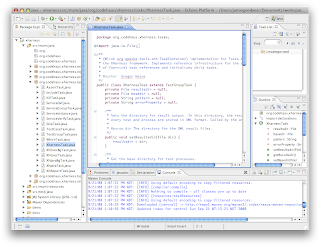
I've been getting into using Eclipse more this month, moving away from my normal vi/vim/nano way of doing things. Its not that I'm particularly against IDEs, its  just that I  spend most of my time remotely connected to AIX, HP-UX, Solaris, and other *nix machines quickly editing files and hence find light weight (resource wise) editors more sensible. When it comes to working with large code bases however my use of these editors slows my progress down considerably.

The only thing that was holding me back from setting up Eclipse with the projects I like to work on has been getting all the code to load correctly and not end up with loads of errors due to not having all the jars loaded. Now however I've started to use m2eclipse to automatically setup my projects.

The project is by all means not new, many of you are probably already quite familiar with it. In case your not however here is a quick introduction to setting up a maven based project in Eclipse.
  • Goto the Maven Integration for Eclipse site (http://m2eclipse.codehaus.org) and install the components required for your Eclipse installation. Alternatively use Eclipse's find & install feature to acquire the plugin.
  •  Once installed follow the next three steps to load your project:
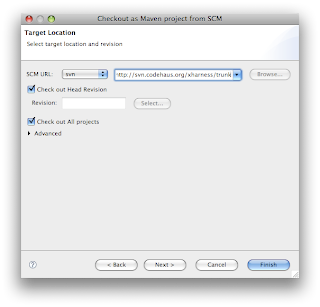
  1. Click File -> New -> Other...
  2. Select "Maven -> Checkout Maven Projects from SCM." from the list.

  3. Select the SCM option for your project, then provide the URL to the SCM, click finish.


Your project resources will now be downloaded and setup :)

Hope this little demo was useful, cheers.